
BOPP Lamination Bubbles: 5 Root Causes and Fixes
Bubbles after thermal BOPP lamination are rarely random — bubble shape, location and timing each point to one process fault. Here are the 5 root causes and the fixes that remove them.
Lamination bubbles are one of the most visible post-press defects — they turn saleable sheets and cartons into rework. For print shops running thermal BOPP film on a heated-roller laminator, the cause is usually not random: bubble shape, location and timing point to one process fault.
1. What type of bubble do you see?
The fastest way to fix lamination bubbles is to sort the defect before touching settings. Large bubbles, dense small bubbles and edge bubbles can look alike to a customer, but they usually come from different faults on the press floor.
Large isolated bubbles — trapped air from excessive speed, low nip pressure, uneven sheet feed, dust, spray powder, or poor film-to-sheet contact.
Dense small bubbles — low heat transfer, high moisture, ink or coating that blocks the bond, or micro-gassing from the sheet surface.
Edge bubbles — uneven pressure, curled sheets, film shrink, edge moisture, or tension mismatch as the sheet exits the heated roller.
Wavy bubbles in the machine direction — a scratch, groove or embedded particle on the pressure roller leaves a gap where air is not expelled; the defect repeats at the roller circumference.
Record where bubbles appear, whether they are constant or intermittent, and whether they grow after a speed or roll change. A simple defect map cuts guesswork before a full batch is affected.
2. Bubble pattern → cause → fix
Use this quick reference to narrow the root cause before changing settings:
| Bubble pattern | Most likely cause | First check | Corrective action |
|---|---|---|---|
| Small round bubbles, random | Insufficient nip pressure | Pressure-indicating film at left, center, right | Increase pressure; level the rollers |
| Bubbles on one side only | Uneven pressure distribution | Compare pressure marks left vs right | Balance cylinder pressure; check bearing wear |
| Large blisters near edges | Adhesive overheating or trapped air | Measure roller temperature at edges | Reduce temperature; slow the line |
| Bubbles on heavy ink areas | Ink not dry or ink layer too thick | Verify drying time after printing | Increase coating weight; extend drying |
| Wavy bubbles in machine direction | Debris or groove on pressure roller | Visual inspection of roller surface | Clean roller; replace if damaged |
| Dense small bubbles, regardless of settings | Moisture in paper | Measure paper moisture content | Dry/condition paper; control humidity |
The bubble pattern points to the fault — classify before you adjust.
3. The 5 root causes behind BOPP lamination defects
1. Temperature is too low. Thermal BOPP film needs heat to activate the adhesive. If the roller temperature is too low, or heat does not reach the bond line, the adhesive only partly flows — leaving weak spots where bubbles stay. Check the roller surface with a contact pyrometer: any zone more than ±5°C from setpoint points to a failing heater band or thermocouple.
2. Speed is too fast. Speed changes dwell time. Sheets moving through the nip too fast don’t let air escape before the film closes over the surface, and the adhesive has less time to wet out across textured ink or coated board.
3. Moisture is too high. Paper and board absorb shop-air moisture. During heated lamination, excess moisture expands or migrates, creating small bubbles, haze or weak bond. Paper above 8% moisture is problematic for most adhesives — store stock at 45–55% relative humidity.
4. Pressure is uneven. Pressure forces film, adhesive, ink and sheet into close contact. Too low, and air stays in low spots; uneven across the width, and bubbles cluster on one side or in repeat bands. Check the nip with pressure-indicating film at left, center and right — all three marks should be identical.
5. The material match is wrong. Heavy ink coverage, slow-drying ink, anti-setoff powder, varnish, textured stock or a wrong film grade can all reduce adhesive contact — and thermal-shrink stress can lift the film after cooling. When the same settings work on one job but fail on another, check the material match.
4. How to fix bubbles by controlling the process
Change one variable at a time, run a short test, check the result, and write down the setting.
- Temperature: raise in small steps when bonding looks weak or dense small bubbles appear — avoid overheating, which causes curl, gloss change, wrinkles or excess shrink.
- Speed: reduce when you trap air; after the defect clears, raise speed carefully and inspect each step.
- Pressure: check nip pressure across the full width and look for side-to-side gaps or worn roller areas.
- Moisture: condition sheets and film in a stable area; avoid cold, damp or fresh sheets.
- Material: verify film, ink, coating and sheet combinations before long runs.
Use this checklist for rapid diagnosis:
| Diagnostic step | Technical target | Corrective action |
|---|---|---|
| Check roller temperature | ±5°C across the width | Adjust zone; check heater/thermocouple |
| Check nip pressure | Even marks at left/center/right | Level rollers; balance cylinders |
| Measure paper moisture | < 8% | Condition stock; control 45–55% RH |
| Verify ink drying | Fully dry before lamination | Extend drying; reduce ink film thickness |
| Inspect roller surface | No debris or pitting | Clean or grind the roller |
5. A YFMA-850 example of stable heat and pressure
Consider a converter laminating carton sheets on the YFMA-850 automatic thermal laminator. The job uses thermal BOPP film, sheet size up to 850×1050 mm, running up to 80 m/min — with electromagnetic heating supporting stable temperature response at the bond point.
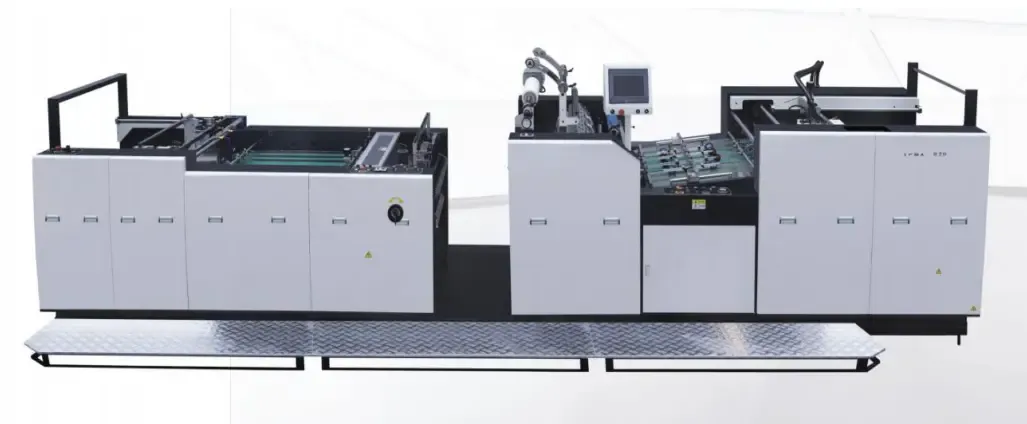
Dense small bubbles appear on a heavy-coverage job. Instead of blaming the film, the operator checks sheet conditioning, slows the line, verifies roller pressure across the width, and lets the EM heating settle before retesting. If bubbles clear at lower speed and correct pressure, the root cause is dwell time or heat transfer — not the film. For buyers, the point is not max speed alone: it is whether the laminator holds steady heat and pressure under real job conditions.
6. Frequently asked questions about lamination bubbles
The questions lamination operators ask most:
Why do bubbles appear after the sheet looks good at the exit?
Delayed bubbles usually come from moisture, weak bond or shrink stress during cooling — the sheet looks fine when warm, then shows air pockets as materials contract or trapped vapor moves.
How can operators tell whether temperature or pressure is the issue?
Temperature issues show as fine, wide defects or weak bond on ink-heavy areas. Pressure issues show as side-to-side changes, edge bubbles, or repeat patterns matching the roller contact zone.
Can higher temperature always remove air bubbles?
No. It helps when adhesive activation is too low, but it will not fix dirt, moisture, severe ink mismatch or uneven pressure — and too much heat can create new defects.
Why change one variable at a time?
Changing several settings at once hides the real cause. A step-by-step method isolates whether the issue is heat transfer, dwell time, pressure, moisture or material match.
Bubbles are rarely random — they follow the temperature, speed, pressure, moisture and material you feed the process. Classify the pattern, change one variable at a time, and record the result. SAGLIN Machinery designs surface-finishing equipment for the Brazilian production reality — send your film type, sheet type, ink coverage and current settings for a sample review.
Still fighting lamination bubbles?
Send a sample — film type, sheet type, ink coverage, size and current settings — and get a technical review before your next full run.
Request Sample Review
