
Hot Stamping: The 7 Most Common Defects and How to Fix Them
Master the three parameters that define hot stamping quality, learn how to choose the right foil for each substrate and eliminate the seven defects that waste the most material in finishing.
Hot stamping turns ordinary packaging into an object of desire — but it is also one of the finishing processes most sensitive to parameter errors. Most defects are born from poorly adjusted temperature, pressure or dwell time. This guide brings together the reference ranges, the foil selection criteria and the solution to the 7 most common defects.
1. Why hot stamping adds value to packaging
Metallic finishes raise the perceived quality of a product — and consumers pay more for it. For the print shop, hot stamping commands a premium margin, differentiates the portfolio and works on coated paper, carton, kraft, labels and laminated prints. The other side is sensitivity: when one parameter leaves the range, the result is waste — and wasted foil is expensive.
2. How hot stamping works: principle and terminology
A heated die (magnesium, brass or copper) presses a multilayer foil against the substrate: heat activates the release layer, the adhesive melts and only the die design transfers. In English markets the process appears as hot stamping, foil stamping or hot foil stamping — synonyms. And note: hot stamping is not embossing, which deforms the paper without transferring material; the two can be combined in embossed hot stamping.
3. Temperature, pressure and dwell time
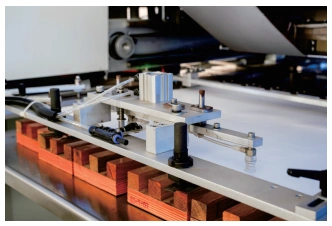
Quality is governed by the golden triangle — temperature, pressure and dwell time — which are interdependent: raising one lets you lower another. Most defects are solved by adjusting these three factors before suspecting the machine or the foil.
Temperature is the most influential parameter and the most badly calibrated: the display measures the heating element, not the die face — 5 to 20 °C are lost along the thermal path. Confirm with an infrared thermometer and use the table below as a starting point (the foil’s TDS is the mandatory reference):
| Substrate | Temperature range (°C) | Initial dwell (s) | Note |
|---|---|---|---|
| Uncoated / offset paper | 95–115 | 1.0–1.5 | Above that, the paper yellows and the adhesive spreads |
| Coated paper / carton | 110–125 | 0.8–1.2 | Most common range in premium packaging |
| Kraft paper | 120–135 | 1.2–1.8 | Rough fibers need more pressure and temperature |
| PET composite / labels | 140–160 | 0.8–1.2 | Foil must be formulated for low surface energy |
| BOPP-laminated / UV-varnished print | 110–130 (special foil) | 1.0–1.5 | Regular foil will not adhere — see section 4 |
Starting ranges for brass dies on flat semi-automatic presses. On high-cadence automatic machines, real dwell is shorter — compensate by working at the top of the temperature range. On rotary presses, with millisecond contact times, ranges shift up to 150–210 °C. Always validate with the foil manufacturer’s TDS.
Pressure: work between 0.4 and 0.6 MPa (4 to 6 kgf/cm²), adjusted to the die area. Pressure also conducts heat — excess blurs edges just like high temperature. More important than the value is uniformity: test with carbon paper on the four corners of the platen.
Dwell time: start at 1 to 2 s and reduce until transfer begins to fail, then return 0.2 s above it. Excessive time spreads adhesive at the edges and cuts productivity.
Method: change one parameter at a time, in small increments, and record each combination — within months you build a per-customer and per-substrate base that eliminates setup rework.
4. Choosing the foil: metallic, pigmented or holographic
Hot stamping foil is not a single product: choose the right family and, within it, the right adhesive formulation for your substrate.
Metallic foil
Gold, silver and metallic colors — the classic of luxury. Mirror finish and excellent coverage on solid areas and fine text. The default choice for wine labels, cosmetics and book covers.
Pigmented foil
Opaque colors (white, black, red, vivid shades) with no metallic effect. Essential over dark or kraft papers, where regular ink lacks coverage and metallic is not wanted.
Holographic foil
Diffraction patterns that change with the viewing angle — rainbows, microstructures, security effects. Strong demand in technology packaging, premium beverages and documents with anti-counterfeiting requirements.
Beyond these, matte, satin and pearlescent foils expand the quiet-luxury repertoire. The trap that generates the most waste is foil × surface compatibility: prints with BOPP lamination or UV varnish have low surface energy and regular adhesive does not anchor — use a foil formulated for low energy and respect the thermal limit of the laminating film.
When buying and storing: check the shelf life (foil lasts about 12 months), store in a climate-controlled room and document the supplier + foil code pair that works in your setup.
Before the machine: preparing artwork for hot stamping
Part of the waste is born in the file, not on the press. Essential rules: 7–8 pt minimum type, a 100% spot color (no tints or gradients), vector outlined elements and at least 3 mm away from trim and scores.
5. The 7 most common hot stamping defects — and how to solve them
This is the section we recommend printing and pinning next to the machine. Each defect appears as the operator sees it on the sheet, with the most likely root cause, the first check — the fastest test that confirms or rules out the cause — and the fix, in the order worth applying, from simplest adjustment to most laborious.
| Defect (as it appears) | Most likely root cause | First check | Fix |
|---|---|---|---|
| 1. No transfer — the design comes out broken, dull, or the foil lifts entirely with the carrier | Real die temperature below range (5–20 °C loss between display and face); insufficient pressure; expired foil; low surface energy substrate; crystallized ink layer (ink with excessive drier, common on prints that waited too long for finishing) | Infrared thermometer on the die face: compare with the display before touching any adjustment | Raise 5 °C per attempt; check the foil’s shelf life; test with carbon paper whether pressure reaches the design area evenly; if the ink has crystallized, blank-press the sheets hot, without foil, to break the layer before stamping |
| 2. Blurred edges — the design transfers, but “bleeds” outside the stroke; fine text clogs | Temperature too high, excessive pressure or long dwell — the liquefied adhesive spreads beyond the die | Is the display above the top of the TDS range? Did the defect appear after raising temperature or pressure? | Lower temperature first (the most likely variable); if it persists, ease pressure or shorten dwell by 0.1 s |
| 3. Torn foil — the foil ribbon breaks during the run and stops production | Poorly regulated foil winding tension (too high); pass route with a burr or misaligned component; foil with a bad splice | Where does the ribbon break — at the reel exit or at the rewinder? The answer separates a tension problem from a roller problem | Reduce rewinder tension; inspect clamps and rollers on the foil route; discard reel splices before feeding the machine |
| 4. Uneven transfer — one side of the sheet comes out perfect, the other flawed | Platen out of parallel (0.05 mm misalignment is enough); die poorly mounted or with dirt behind it | Carbon paper on the four corners of the platen, one cycle, compare the intensity of the marks | Level the platen at the adjustment points (wedges or eccentric screws); clean and remount the die |
| 5. Stains / “burnt” look — areas with irregular shine, halos or substrate discoloration | Temperature oscillating during the run (PID controller or thermocouple with poor contact); moisture in the substrate; varnish or ink not fully cured | Watch the thermometer for 30–60 s: oscillation beyond ±5 °C indicates a thermal control problem, not a process adjustment issue | Check the thermocouple and resistance mounting; condition the paper to room climate before stamping; confirm varnish cure time with the ink supplier |
| 6. Doubled sheets — double sheets enter together and get stamped one over the other | Sheets with static charge; feed pile too high; misregulated sheet separator | Does the defect worsen on dry days and vanish on humid ones? That is the classic signature of static electricity | Reduce pile height; adjust feeder suction/blower; in dry environments, humidifiers solve static; on servo machines, enable the double-sheet pre-suction device |
| 7. Variation across the same sheet — the center stamps well, the edges come out weak (or the opposite) | Irregular heat distribution on the thermal plate; large-format die with uneven thermal mass; setup done before the machine stabilized | Measure center and four corners of the die with the thermometer: a 5-point thermal map reveals the distribution in one minute | Wait 10–15 minutes of heating before the first test; compensate with heating gaps; for large formats prefer brass dies: thicker and more stable under prolonged heat, they hold the die plane better than magnesium |
Golden rule of diagnosis: change one parameter at a time and test 10 sheets before drawing conclusions.
Note that six of the seven defects originate in parameters or setup — not machine failure. An eighth symptom is deliberately left out: progressive position drift during the run (the artwork stamps perfectly, then starts shifting) is registration drift and needs mechanical service, not a parameter adjustment.

6. How to choose a hot stamping machine
As volume grows and the mix widens, the limit stops being the operator and becomes the equipment. The three generations — manual, pneumatic and automatic servo — differ in speed, format and consistency; see the full comparison in the guide Hot Stamping Machine: Manual vs. Pneumatic vs. Automatic. In short, what the servo machine sells is consistency — the JXZC-95 delivers 40 t with servo control, an 800 × 530 mm format, 26 cycles/min and double-sheet pre-suction, attacking exactly defects no. 4 and no. 6 from section 5.

JXZC-95 · Automatic Servo Hot Stamping Machine
- 40 tons of pressure with servo control — transfer repeatability in continuous production
- 800 × 530 mm format, up to 26 cycles/min with automatic feeding
- Double-sheet pre-suction: separates sheets before the conveyor and eliminates waste from stuck sheets
7. Frequently asked questions about hot stamping
The questions we receive most from print shops evaluating or operating hot stamping:
What is the ideal temperature for hot stamping?
There is no single temperature: it depends on the substrate and the foil. As a starting reference, use 95–115 °C for uncoated papers, 110–125 °C for coated paper and carton, 120–135 °C for kraft papers and 140–160 °C for PET composites. Always adjust in 5 °C steps and confirm the exact range in the foil manufacturer’s technical data sheet (TDS).
Hot stamping or cold stamping: which should I choose?
Hot stamping uses a heated die and delivers superior metallic shine, sharper edges and compatibility with difficult substrates — plus combined embossing. Cold stamping applies the foil with a UV-activated adhesive, with no heat, inside the press line itself, and is better suited to very long runs of self-adhesive labels and flexible films. As a rule of thumb: below ~2,000 pieces, embossed work or difficult substrates favor hot stamping; in high-volume flexible labeling, cold stamping can pay off. A third route — digital foil, with toner-reactive adhesive applied on digital presses — covers very short runs and variable personalization with no die and no setup.
Can I hot stamp over BOPP lamination or UV varnish?
Yes — but not with regular foil. Cured BOPP lamination and UV varnish create low-energy surfaces where the standard adhesive does not anchor: the foil apparently transfers well and then releases hours or days later. Use a foil formulated for low surface energy and respect the thermal limit of the laminating film — overheating deforms the BOPP. Always run a tape test on a sample before releasing the run.
How much does it cost to stamp one sheet in hot stamping?
There is no single value: the cost per sheet combines four components — foil consumption (proportional to the stamped area plus the advance between sheets), machine time, die amortization and setup labor. On short runs the die dominates the cost — which is why the unit price drops fast with volume; on long runs, foil and machine time dominate. To price a job, add the setup cost divided by the run length to the variable cost per sheet and validate the margin against the perceived value of the premium finish.
How do I request a hot stamping machine quote?
Gather three pieces of information before contacting the supplier: the maximum formats you need to stamp, the substrates most used in your mix and the average volume per order. With this data, the SAGLIN technical team recommends the appropriate automation level (manual, pneumatic or automatic servo) and sends the commercial proposal through the contact form.
Hot stamping rewards those who treat it as an engineering process: documented parameters, defects diagnosed by the look of the sheet and equipment capable of repeating the right condition on every run. Want to enter the hot stamping market or leap from manual to automatic? Talk to our engineers.
Ready to master hot stamping?
Get a line assessment and the right machine quote for your production mix.
Request a Free Assessment
